Why Cortex Never Hides Your Code
Chat-only AI IDEs hide the file tree. Cortex keeps Explorer, search, and Monaco one click away. For developers who still want to read the code.

The short answer: Cortex is agent-first and code-always. The agent writes most of the files. Explorer, project search, and a Monaco editor stay on the same screen, one click from any file. This page is for developers who still want to read the code they ship, not a chat summary of it.
Who is this for?
Developers who run an agentic loop and still open the files. Use this when you review diffs, rename modules, and fix one line by hand. Skip it if you want a chat window that never shows the repo.
AI coding tools make different trade-offs. A terminal-first agent such as Claude Code works with files in your repository, but you may prefer a separate visual editor to inspect them. Chat-first products put the conversation at the center; IDE-first products keep the file tree and editing surface close to the agent. Neither approach is wrong. The question is how many steps it takes you to inspect and change the source after the agent answers.
Cortex is agentic-first too. The autonomous loop is its engine. One pattern I refused from day one: hiding your code. In Cortex, the working project is always there: full file tree, project-wide search, and any file one click from a real Monaco editor. No mode switch. No Open in IDE button.
What does agent-first, code-always mean?
The AI writes most of the code. You never lose a one-click path to the files. When an employee writes code for your company, they wrote it, but it is your product. You would never accept "trust me, it works" without opening the files. An AI agent is that employee. It types faster than you and costs tokens instead of salary. The output still ships under your name.
Vibe coding changes who types. It does not change who owns. When you are the owner, two jobs stay yours:
- Thinking. What should this do? What does done look like? What instruction gets the agent there? That is where your time goes now. The code is the cheap part.
- Verification. The loop verifies with tests and exit codes. A reviewer model can audit the diff. The final auditor is you, and you cannot audit what you cannot see.
Should I use a chat-only coding tool instead?
Use chat-only tools for throwaway prototypes. Use Cortex when the repo ships under your name. Chat-only interfaces have a cost nobody prices in: you lose your mental map of the codebase. When every change arrives as a summarized diff, you stop knowing where things live. Three weeks in, the project is yours on paper and a stranger's in your head. The research already measures the result: only 29% of developers trust AI-generated code, and unreviewed AI code carries more vulnerabilities. Distance breeds both the distrust and the defects.
| If you need | Use this first | Leave for later |
|---|---|---|
| A throwaway prototype, no file map | A chat-only agent | An IDE you will not open |
| Ship a repo you still own | Cortex: tree, search, Monaco, one screen | A tool that hides the editor behind a toggle |
| Fix one line without writing a prompt | Click the file, edit it | A paragraph of instructions for a one-character change |
| Spot-check the two files the agent just touched | Clickable diffs in the same window | Copy a path, switch apps, hunt the file |
The fix is not reading every line the agent writes. That defeats the point of agents. The fix is keeping the connection cheap: when something feels off, you click the file. When a change is small, you make it yourself. When the agent finishes, you spot-check the two files that matter. Each of those actions takes seconds in an IDE and a context-switch in a chat tool. Actions that cost a context-switch stop happening.
How does Cortex keep the code on screen?
Chat, agent activity, file tree, editor, and terminal share one screen. Agentic-first and code-always are two halves of one workflow.
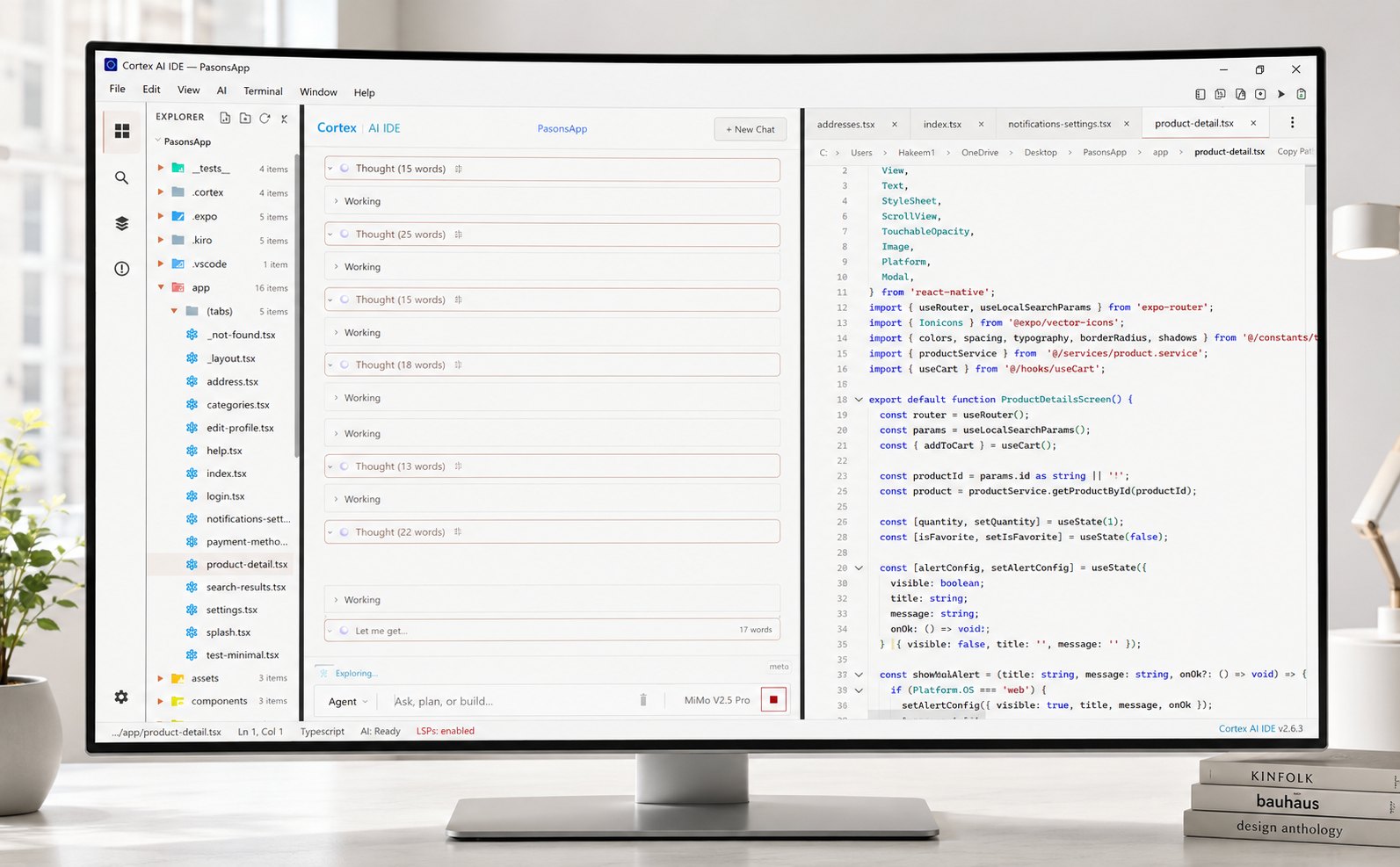
- Hand off like a manager. Describe the goal. The loop plans, edits, runs, and verifies, with budgets and safety gates.
- See everything, always. Explorer shows the real file tree live. Files the agent creates appear as it creates them. Project-wide search (by name, text, or meaning) stays available.
- One click to the code. Any file opens in Monaco, the same editing core developers already know, with syntax highlighting, multi-tab, and full manual editing.
- No switching. The agent's diffs are clickable. The files they touch are openable. Your edits and its edits land in the same place.
On our machine we ran a 40-file Django auth refactor in Cortex v3.0.47. Mid-run I clicked account/views.py while the agent was still writing tests. The tab was already in the editor. That is the original-experience reason this layout exists: verification without leaving the app. The newest wave of vibe-coding tools treats direct code access as an advanced feature to hide. That is backwards. The less code you personally type, the more the one-click path to reading it matters.
What should I do next?
Download Cortex, hand the agent a task, and mid-run click any file it is touching. The ambition is simple: the AI writes your code, and you never lose the connection to it. You bring the thinking (what to build, how it should behave, what done means). The agent brings the typing, the iteration, the test runs. Between you and it sits your actual codebase: searchable, clickable, editable, yours. That is the difference between delegating your work and surrendering it.
Download Cortex. It is your code. You should never have to switch apps to look at it.
Frequently asked questions
What does agent-first, code-always mean?
The agent writes most of the code. The file tree, project search, and a real Monaco editor stay on screen so you can open any file in one click. No mode switch and no Open in IDE button.
Who is this for?
Developers who use an agentic loop but still review diffs, rename files, and fix a line by hand. Skip it if you want a chat window that never shows the repo.
Should I use a chat-only coding tool instead?
Use chat-only tools when you want a throwaway prototype and do not care about the file map. Use Cortex when the repo ships under your name and you need to click into the files the agent just touched.
Does Cortex still run an autonomous agent?
Yes. The plan-act-verify loop is the engine. The difference is layout: chat, tree, editor, and terminal share one screen, so verification does not require leaving the app.